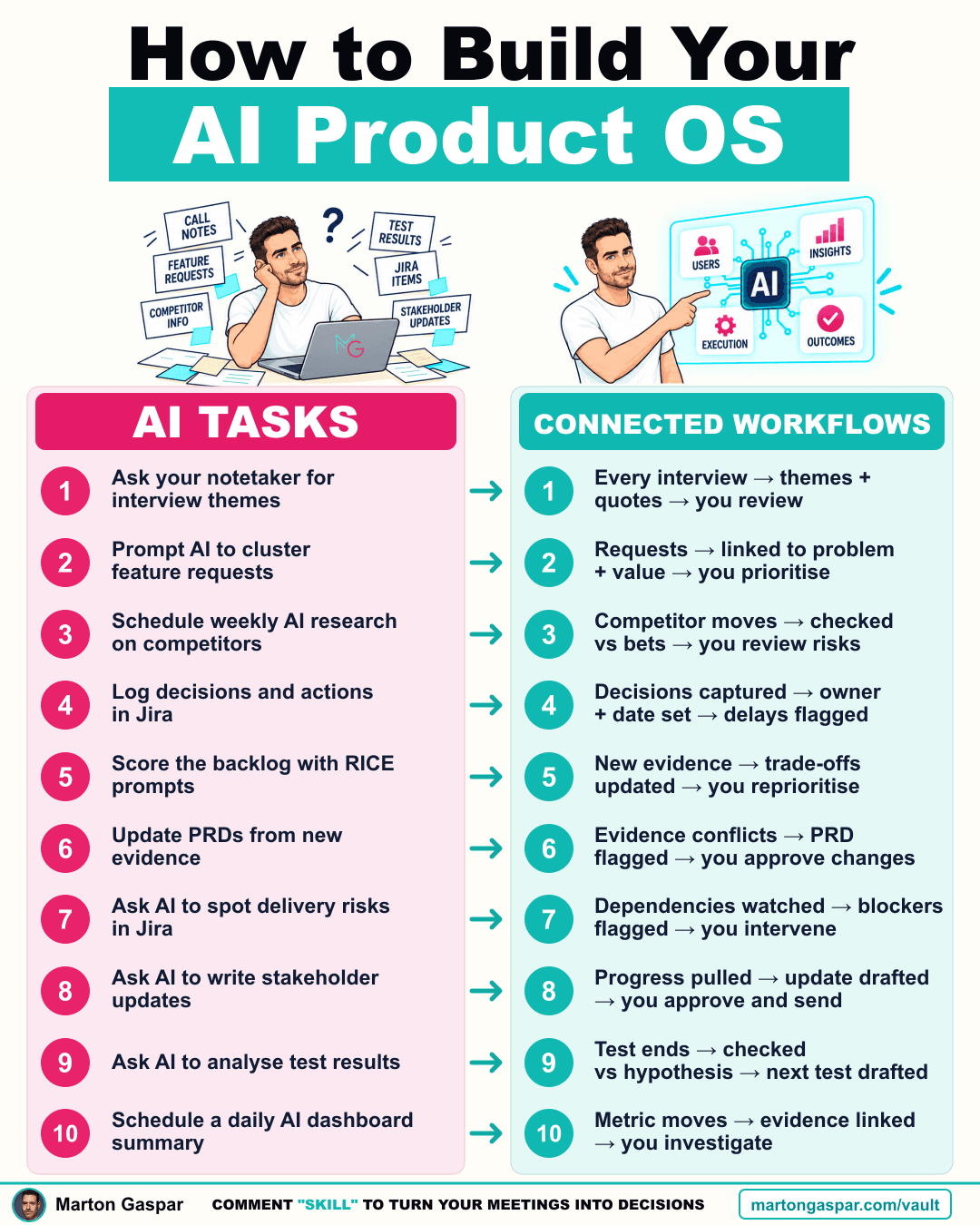
I removed myself from 10 repetitive PM tasks. Not by doing them faster. By not doing them.
I was a PM and a copy-paste monkey. Notion to ChatGPT or Claude, then back to me. Every time. The AI did the task. I was the workflow.
That is the trap with using AI one prompt at a time. Each task gets quicker, but a person still carries the work from one step to the next. The shift is from AI tasks to connected workflows, where the work moves on its own and you step in at the point that needs a decision.
Here are 10 setups that only need you to decide.
1. Standardise interview notes
Stop re-reading every transcript to compare findings.
Set up: save this notetaker template: "Extract problem, user type, impact, workaround and exact quote." Send each call's results to one research table. Every interview then lands in the same shape, so you can compare findings across calls instead of rebuilding them from memory.
2. Group requests by problem
Stop manually sorting the same need under different feature names.
Set up: add "What is the user trying to do?" to intake. Have AI suggest a matching problem from your backlog and flag uncertain matches. Five requests that look different often describe one problem, and the uncertain ones still come to you.
3. Filter competitor research
Stop reading competitor updates that don't challenge your bets.
Set up: add your three current bets to your scheduled research prompt: "Flag moves that challenge these bets. Link the source and affected assumption." Research becomes a check against what you believe, rather than a feed to scroll.
4. Automate the chasing
Stop checking whether people have done what they agreed.
Set up: give agreed actions an owner and due date in Jira. Remind the owner when overdue; alert you after two days. The reminder goes to the person who owns the action first. You only hear about it when it has stalled.
5. Keep backlog scores current automatically
Stop checking whether every backlog score still holds.
Set up: add a "Revisit if…" condition to your top five items. Tell your research workflow to flag new evidence that meets one. A score is only as good as the evidence behind it, and this tells you when that evidence has moved.
6. Flag outdated PRD assumptions
Stop manually checking if new evidence breaks your PRD.
Set up: add this to your research prompt: "Check against the linked PRD. Quote conflicting evidence and suggest changes for approval." The PRD changes only when you approve it, but you no longer have to go looking for the reason to change it.
7. Catch dependency risks before they block you
Stop checking every dependency to find the one at risk.
Set up: record an owner and needed-by date for each dependency. Alert you two working days beforehand if it remains unresolved. Two days is enough warning to act, rather than finding out on the day the work stops.
8. Draft stakeholder updates automatically
Stop collecting status from several places every week.
Set up: connect a weekly AI task to Jira and your decision log: "Draft progress, blockers and decisions needed. Link sources. Save for approval." You review a draft with sources attached instead of building the update from scratch.
9. Decide what the test needs to prove upfront
Stop reconstructing what a test was meant to prove.
Set up: add to the brief: "Success means _. If positive, we _. If negative, we _. If inconclusive, we _." Have AI assess results against it. Writing all four outcomes before the test runs means the result points to a next step, whichever way it goes.
10. Add context to every metric alert
Know what changed before you dig in.
Set up: set a threshold for one key metric. Include your release and experiment log links in the alert. Treat them as leads, not proof of cause. The alert arrives with the likely suspects attached, and the judgement about what caused the change stays with you.
You were the workflow. You don't have to be.
Look across the ten and the same pattern repeats. Each setup does the gathering, sorting, chasing or drafting, and stops at a point where a person decides: you review, you prioritise, you approve, you intervene, you investigate.
That split is the point. The repetitive work moves without you carrying it. Your attention goes to the calls that need product judgement. For a wider view of how strong product teams put a system under the way they decide, see /vault/how-top-product-teams-use-ai.
I help PMs and teams build exactly this.
Where to start
Don't set up all ten at once. Pick the one task you did by hand most often this week, the one where you were the copy-paste step between two tools, and set that up first.
Then watch what you still touch. If you are only stepping in to review and decide, the setup is doing its job. If you are still carrying the work between steps, the workflow has a gap, and that gap is the next thing to fix.
Which one is still on your plate?