Stop asking your engineers or designers for prototypes you can build yourself. You can do it in hours.
The best product managers I've coached don't pitch ideas and hope. They build a quick prototype, get a real answer and bring the insight back to their team. The conversation then starts with evidence rather than a slide.
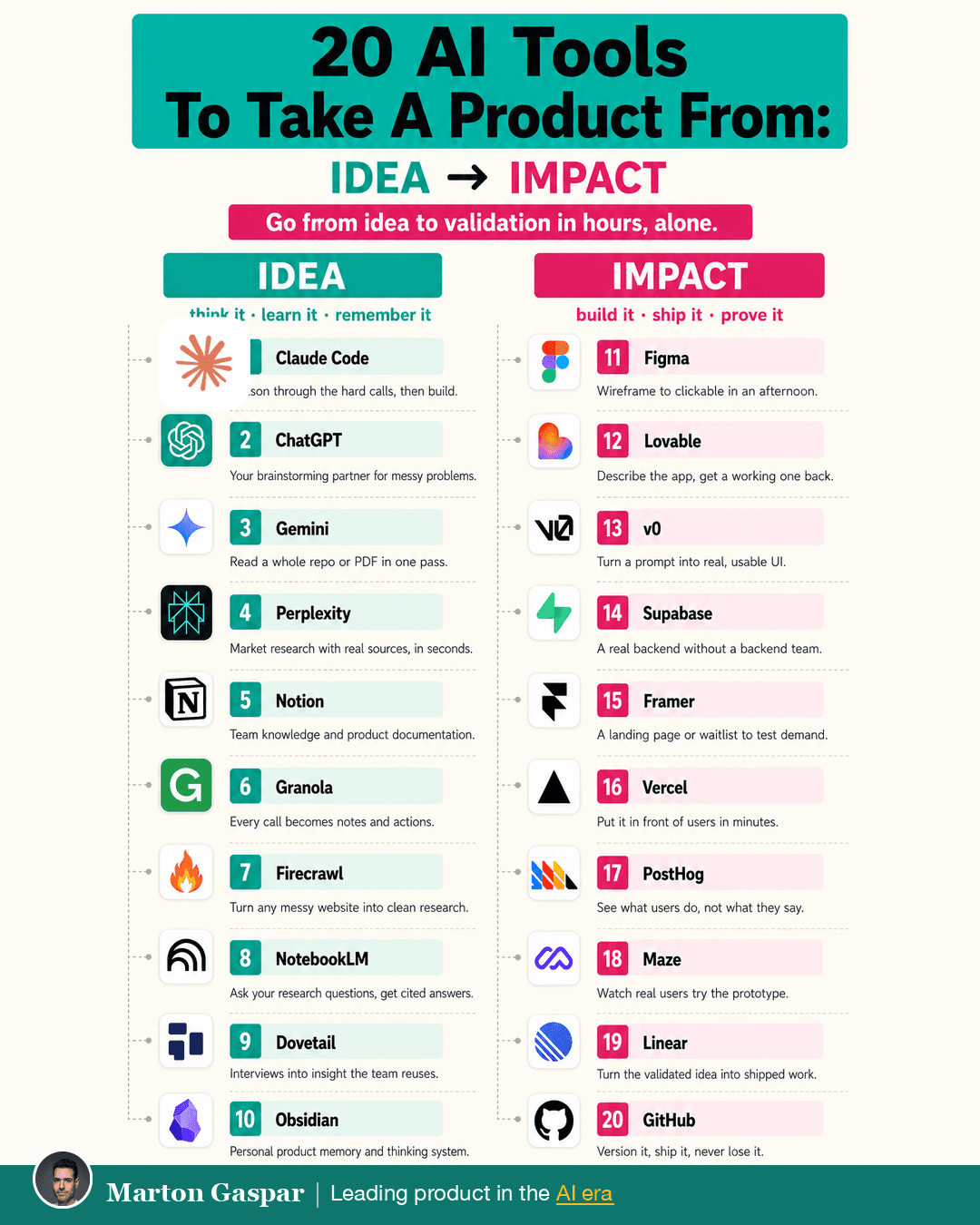
You don't need code or a big setup to start. Below are the five steps from idea to proof, the 20 tools on the infographic and the one connection that makes them more than a pile of subscriptions.
Research the market and your competitors
Start with Perplexity and Firecrawl. Perplexity gives market research with real sources. Firecrawl turns messy websites into clean research you can work with.
The payoff is a straight answer in an hour, not a week. You go into the next step knowing what already exists and where the gap might be.
Turn the rough idea into a clickable prototype
Use Lovable or Figma. Lovable takes a description of the app and gives you a working one back. Figma gets you from wireframe to clickable in an afternoon.
The payoff is a working version by lunch, not a two-week build. A rough working version answers questions that a document never will, because people can react to it. It does not need to be pretty. It needs to be real enough that someone can try to use it and show you where it falls short.
Put it in front of real users
Ship it with Vercel and test it in Maze. Vercel puts it in front of users in minutes. Maze lets you watch real users try the prototype.
The payoff is that you see what people do, not just what they say. Those two are often different, and the difference is where the learning is. Watching a handful of people get stuck on the same screen tells you more than a long survey about what they think they would want.
Let the data kill the weak ideas
Use PostHog and Framer. Framer gives you a landing page or waitlist to test demand. PostHog shows what users do once they arrive.
The payoff is the sprint you save. A weak idea that dies here costs you a few hours. The same idea found out the hard way costs a sprint, or more.
Bring the result back to your team
Capture what you learned in Notion and turn it into work in Linear. Notion holds the team knowledge and product documentation. Linear turns the validated idea into shipped work.
The payoff is that you start the conversation with proof, not a pitch. Engineers and designers get a tested idea with evidence attached, which is a very different request from "can you build me something to see if this works".
The 20 tools, from idea to impact
The infographic splits the tools into two halves.
The idea half is about thinking, learning and remembering. Claude Code, to reason through the hard calls and then build. ChatGPT, a brainstorming partner for messy problems. Gemini, to read a whole repo or PDF in one pass. Perplexity, Notion, Granola (every call becomes notes and actions), Firecrawl, NotebookLM (ask your research questions and get cited answers), Dovetail (interviews turned into insight the team reuses) and Obsidian, a personal product memory and thinking system.
The impact half is about building, shipping and proving. Figma, Lovable, v0 (a prompt turned into real, usable UI), Supabase (a real backend without a backend team), Framer, Vercel, PostHog, Maze, Linear and GitHub, to version it, ship it and never lose it.
Connected tools compound, and memory is the connector
On their own these tools are useful. Connected, they compound. The easiest place to connect them is memory.
Claude Code is where you think, research and build. Connect it to Obsidian as the memory that holds every idea, decision and result. Now each idea you run leaves a trail, so the next one starts from everything the last one taught you, not a blank page.
It's how I run mine. It's the difference between a system that gets better every time and 20 tools you keep re-teaching.
For a different angle on the same question, Product Manager Tool Stack (/vault/product-manager-tool-stack) covers how two questions changed which tools earn a place in the first place.
Start with one idea this week
You can start this week, with tools you already use. You don't need all 20. Most product managers already have a few of them open every day. Pick one tool for each of the five steps and ignore the rest until you need them.
Take one idea you keep circling, run it through the five steps and have the answer back in hours. Write down what you learned, where it lives and what you would do differently next time. Do it once and you've already changed how you work.