The new AI that can't write cleared my backlog for a penny.
It sorts every small decision. You keep the big ones.
AI gave product managers more to decide, not less. More ideas, more tickets, more notes, more requests. The piles grow faster than anyone can read them.
The backlog. The support queue. The request you're sure you've seen before. The customer pain your roadmap hasn't covered. Last month's interview notes.
Each pile is hundreds of tiny calls. Keep or bin? Bug or request? New idea or duplicate? None of them is hard on its own. Together they eat the week.
So I built five free skills for product teams that clear each pile, using one judge model called Jev. Here is how they work, and why the approach matters more than the tool.
Why a chatbot summary is not a decision
The obvious move is to paste the pile into a chatbot.
You get a confident summary back. It reads well. But you can't check a single call it made. Which tickets did it treat as duplicates? Which feedback did it file under the wrong theme? The summary hides every decision inside the prose.
For triage that is the wrong shape. Triage is many small, separate decisions. You need to see each one, and you need to know which ones to double-check.
Ask one question per item instead
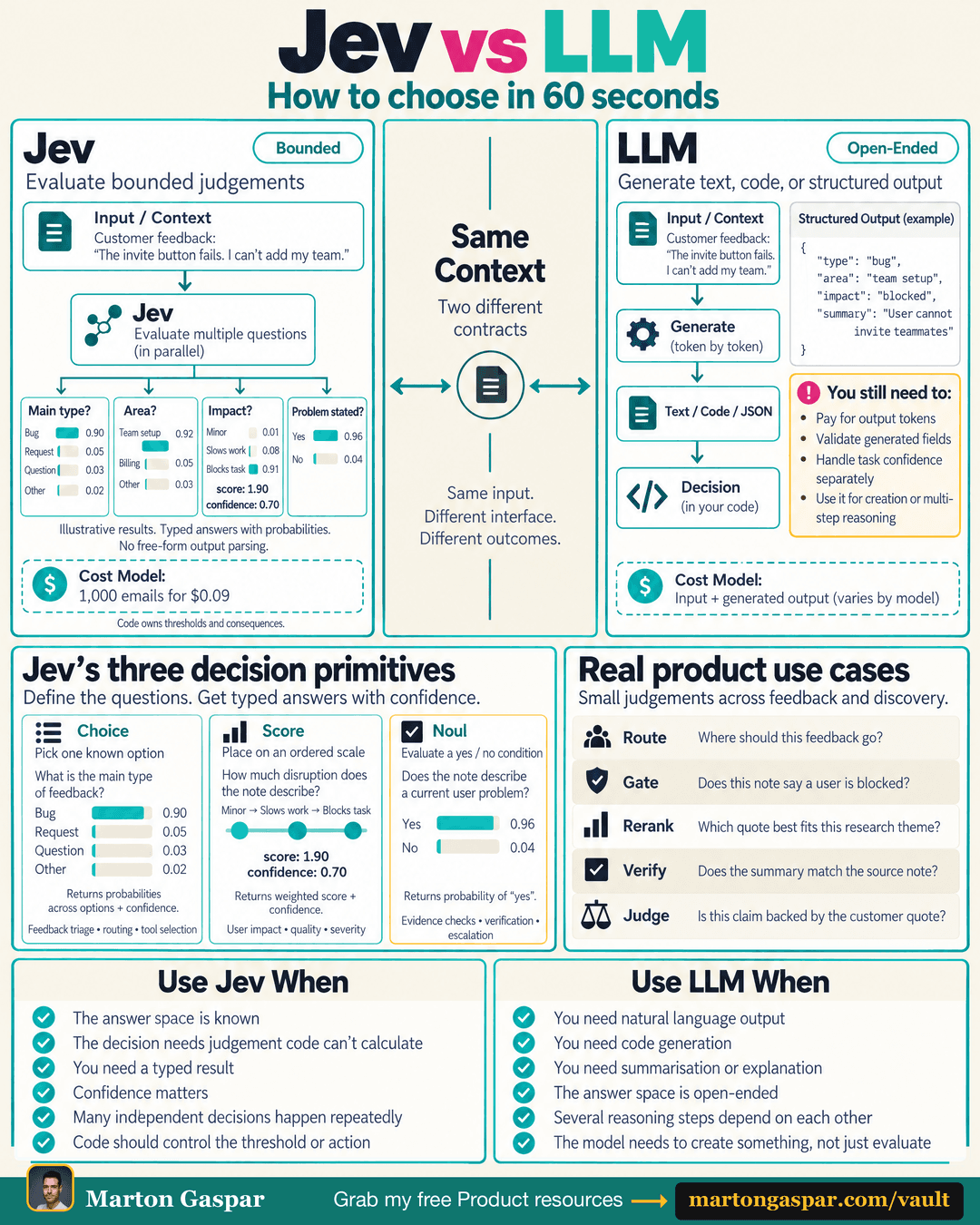
Jev is a judge model, not a chatbot. It doesn't write. It answers each item with a choice, a score or a yes/no, and it says how sure it is.
A choice picks one known option, such as bug, request or question. A score places the item on an ordered scale, such as how badly it disrupts the user. A yes/no checks a condition, such as whether a note describes a current user problem.
Because every answer comes with a confidence, your own rules decide what happens next. High confidence goes straight through. Low confidence comes back to you. The thresholds and the consequences stay in your hands.
The rule of thumb: use a judge model when the answer space is known and the same kind of decision repeats many times. Use a chatbot when you need it to write, summarise, explain or reason through several dependent steps.
Backlog Keep-Check: decide what stays
The Backlog Keep-Check reads old tickets against your strategy.
It can only say keep. What goes stays your call.
That limit is on purpose. Clearing a backlog is a strategy decision, and removing work is the part with consequences. The skill does the reading and hands you a shorter list of tickets that didn't earn a keep, so you make the cuts with the evidence in front of you.
Feedback Sorter: tag every ticket, keep the original
The Feedback Sorter tags every support ticket and flags the blockers.
It keeps the original attached to each tag. So when a theme looks big, you can open it and read what customers actually wrote, rather than trusting a label.
Request Matcher: turn a repeat request into evidence
The Request Matcher finds the idea you already have.
When a new request matches something in your backlog, it stops being another ticket. It becomes evidence for the existing idea. Over time the ideas with real demand behind them become obvious, and the backlog stops growing with near-duplicates.
Strategy Coverage Check: see the pain no bet covers
The Strategy Coverage Check maps customer pain against your current bets.
It shows the customer pain none of your bets cover. That gap is not automatically a problem. Some pain is fine to leave alone. But it should be a choice you made, not something nobody noticed.
Decision Check: test the question before you trust it
The Decision Check builds a question from 20 items you've labelled yourself, then tests the rest of the pile against it.
This is the skill for any triage question that isn't covered by the other four. You teach it with your own judgement first. It applies that judgement to the rest, and you can see where it agrees with you before you rely on it.
What it cost, and what it buys back
I ran Jev on 92 of my own items. It cost less than a penny.
The money is not the point. The point is the week. You didn't become a PM to spend your week triaging tickets. The small calls still need making, and they need to be checkable. They don't need your full attention one by one.
Hand the pile over. Get back to the decisions only you can make: which problem matters, which bet to fund, what to say no to.
All five skills are free in the vault: /vault/backlog-keep-check, /vault/feedback-sorter, /vault/request-matcher, /vault/strategy-coverage-check and /vault/decision-check.
Which pile would you hand over first: backlog or support?