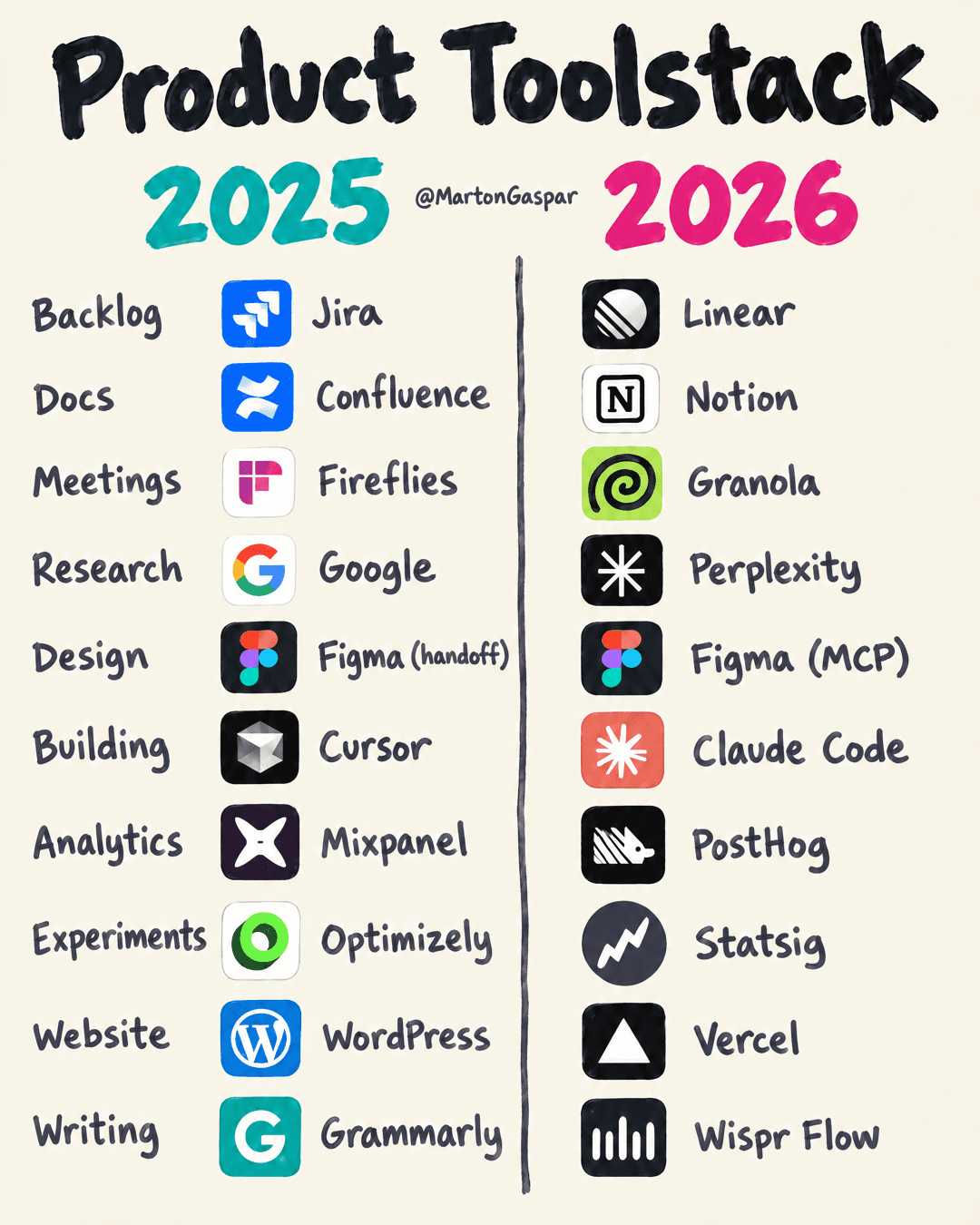
My product stack is completely different. In just one year.
Engineers can ship faster now. Giving them the right thing to ship can be super hard. That second part is the product manager's job, and it is where the tool stack starts to matter.
I didn't sit down and decide to replace ten tools. I started building a system around Claude. Once that system existed, every tool around it had a different job. A tool could be good on its own and still be wrong for the system.
The chart that goes with this article puts two stacks side by side across ten jobs. The 2025 column is what I used a year ago, and close to what most product teams still run. The 2026 column is what I use now. The jobs in both columns are the same. What changed is how the work moves between them.
The two questions I use to pick a product tool
Now I choose tools with two questions.
Can Claude, or the next tool, use what this produces without me copy-pasting it by hand?
Does it remove a step that still depends on someone else?
The first question is about flow. When a tool's output needs a person to carry it to the next place, the work stops there and waits. The second question is about dependency. Every step that needs another person's calendar is a step where the work sits in a queue.
Neither question asks which tool looks best in a demo. A tool can win a side-by-side comparison and still fail both tests.
Meetings show it best. Granola and Fireflies can both summarise a call. A meeting tool that only gave me notes was no longer enough, though. I needed the interview to keep moving: into a synthesis, into product ideas, into what to test next. Granola was easier to connect to that system, so it became more useful to me than Fireflies. Same job on paper, different fit.
That pattern repeated across the stack. Each time Claude could do more, I found the next gap around it.
Getting thinking out of heads: meetings, writing and docs
Meetings come first because so much product work starts with a conversation. Fireflies to Granola is the swap described above, and it is the start of the chain. If the call can feed the next step directly, everything after it starts with context instead of a blank page.
Writing moved from Grammarly to Wispr Flow. Grammarly checks and polishes text you have already typed. Wispr Flow is voice dictation: you speak, and it writes. Polish is the last step in writing. Dictation is the first one. It gets a raw thought into a form Claude can work with before anyone has typed it up properly.
Docs moved from Confluence to Notion. Both are workspaces for team documents. Docs hold the thinking behind the work: the synthesis, the decisions, the reasons. The test here is the first question. A synthesis written today should be something the next step can read tomorrow, without me copying it across.
Turning ideas into work: research and backlog
Research moved from Google to Perplexity. Google gives you a list of links to read. Perplexity is an answer engine: you ask a question and get a written answer with its sources. For the system, a written answer is easier for the next step to pick up than ten open tabs.
The backlog moved from Jira to Linear. Both are issue trackers, the place where ideas wait to become work. The backlog sits in the middle of the chain. When a call turns into a synthesis and the synthesis turns into a product idea, the question is whether that idea can become a ticket without me retyping it somewhere else.
Building it: design and building
Design is the one row where the tool stayed the same. Figma is still Figma. What changed is how its output moves.
In the 2025 column, design runs on handoff. Someone exports the screens, annotates them and explains them to whoever is building. In the 2026 column, Figma connects through MCP, the Model Context Protocol, which lets an AI tool read the design file directly. This row is the second question in action. The handoff was a step that depended on someone else, and connecting the file removes it.
Building moved from Cursor to Claude Code. Cursor is an AI code editor. Claude Code is Anthropic's coding agent, and it sits at the centre of the system I built around Claude. Building is where the earlier steps pay off. If the synthesis, the idea, the ticket and the design are all readable, the build starts with context instead of a briefing.
Testing and shipping it: analytics, experiments and the website
Analytics moved from Mixpanel to PostHog. Both are product analytics tools. The question I put to analytics is whether its numbers can come back into the system, so what users did feeds the next idea without someone exporting a report first.
Experiments moved from Optimizely to Statsig. Both run experiments. The best idea from a synthesis becomes something I can test, and the experiment tool is where that test lives. It needs to sit close to the code and close to the numbers.
The website moved from WordPress to Vercel. WordPress is a content management system. Vercel is a platform for deploying websites and web apps built in code. With the site in code, the same agent that builds a feature can change a page, and a page change no longer waits in another person's queue.
People still do the hard part
The 2026 column isn't a list of better tools. It's the set that fits the system I have now.
The best part isn't the speed. It's that the output from one step feeds the next. A call becomes a synthesis. The synthesis gives me product ideas. The best one becomes something I can test.
None of the tools make the calls. Choosing which idea is worth testing, reading what the test says and deciding what to build next all stay with people. People still do the hard part. I just stop blocking them while I catch up.
If you want to check your own stack, take one recent piece of work and trace it from the first conversation to the first test. Count the times someone copied something between tools by hand. Then count the times the work waited on another person. Those two numbers show you where your stack and your system part ways.