Claude Skill
The Decision Review Board
You've got four calls to make this week and they're scattered across six chats. This lays them side by side, you mark each one, and it hands you the whole log.
Want the skill?
Install & use
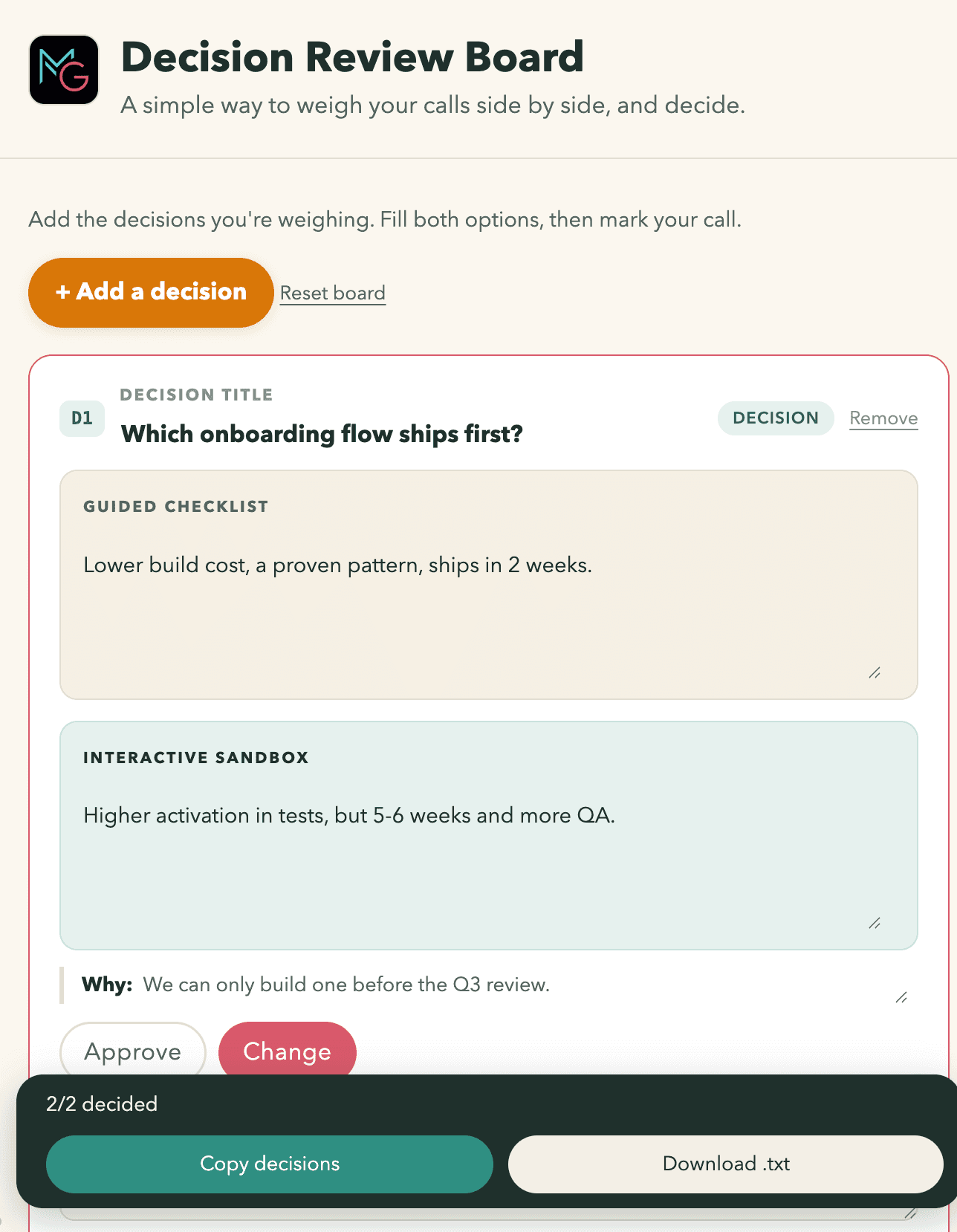
Tell Claude what you're weighing and it builds you a board. Each decision becomes a card: the choice in the title, the two options side by side, and the line that says what makes it hard. You mark each one, hit copy, and paste the whole log wherever you keep decisions. Five minutes to set up, once.
- 1
Download the file. Don't unzip it.
- 2
Open Claude Code and start a new session.
Install this skill for me. Then tell me, in plain English, what it does and what I should say to start using it. - 3
Drag the file straight into the message box.
- 4
Paste the line below, and press enter. Claude does the rest.
That is the whole install on Claude Code and Cowork. In a browser or the desktop app Claude can't reach your files, so use Settings, Customize, Skills, Add, Upload skill instead.
How it works
- Part 1. Install it
- Part 2. Start a board
- Part 3. Say what you're weighing
- Part 4. Mark them and get the log out
Why the reasoning disappears
Decisions get made in the middle of long threads. Six weeks later someone asks why you went that way, and the answer is buried in a chat you'd have to scroll for twenty minutes to find.
The scrolling isn't the cost. The cost is that you can't tell, afterwards, whether it was a good call or a lucky one. The thing that would settle it, the reason it was hard at the time, was never written down.
A board makes that a required field. You can't mark a card without saying what made the decision difficult.
Part 1. Install it
Four steps. You never open Settings, and you never unzip anything.
- 1.Download the file.
- 2.Open Claude Code and start a new session.
- 3.Drag the file into the message box.
- 4.Paste the line below and press enter.
Install this skill for me. Then tell me, in plain English, what it
does and what I should say to start using it.Drop the file here
review-board-skill.zip
If you're not in Claude Code
In a browser or the desktop app, Claude can't reach your files, so you install it by hand instead. Open Settings, find Customize in the left-hand menu, click Skills, click Add, click Upload skill, and choose the file. You'll also need Cloud code execution switched on, over in Capabilities.
- Upload skill
- Create a skill
- Create with Claude
Part 2. Start a board
Four steps.
- 1.Open a new chat.
- 2.Click the model name at the bottom right and choose Opus 5.
- 3.Click the effort next to it and choose High.
- 4.Type what you're weighing, and press enter.
Describe a task or ask a question
Why Opus, and why High
Working out what the real choice is, and what actually makes it hard, is the whole value here. Sonnet and Haiku are faster and will hand your topic back to you as a heading rather than turning it into a decision.
High effort is the default, so usually you change nothing. Reach for Max only when the decisions tangle together and one depends on another.
Set both before you start and leave them. Changing part way through makes Claude lose the thread.
Part 3. Say what you're weighing
Don't tidy it up first. Dump all of them in one message, messily. Claude sorts them into cards.
For each one, get these across. Half a sentence each is fine.
- 1.What the choice actually is. Not the topic. The choice.
- 2.The two options you're really weighing.
- 3.What makes it hard. The constraint, the thing you can only do once.
- 4.Anything already decided that the others have to fit around.
Here's a real one
Deliberately scruffy. Yours can be worse.
Four things to sort before Thursday's review.

Onboarding: do we ship the short flow or the guided one first. Only got
one sprint so it's genuinely one or the other.

The pricing page copy came back from Sam covered in comments. Half of
them I agree with, half feel like taste. Need to decide what I take.

Whether the mobile team owns notifications or we do. Nobody wants it.

And do I push the API work to next quarter. Already told the CS team
it's coming, which is the awkward bit.
Part 4. Mark them and get the log out
The board opens in your browser. Nothing is being generated while you decide, so take your time.
- 1.Read each card.
- 2.Mark it Approve, or Change.
- 3.If it's Change, type what would have to be different.
- 4.Click Copy decisions at the bottom.
- 5.Paste the log wherever your team keeps decisions.
When to reach for it
Three or more decisions in play. One decision is a conversation. Three or more is where they start getting lost.
The usual moments: prioritising the quarter, working through a pile of stakeholder feedback, reviewing a spec that came back marked up, choosing between approaches that are all defensible.
Questions people ask
- What is the Decision Review Board?
- It is a free Claude skill that lays several decisions out side by side as cards, so you can weigh and mark them in one place instead of losing them in a chat thread. It then hands you the whole decision log to paste wherever you keep records.
- When should I use a decision board instead of just deciding?
- Use one when three or more decisions are in play at once. A single decision is a conversation. Three or more start getting lost, and the reasoning behind each one disappears with them.
- How do I install the Decision Review Board?
- Download the file without unzipping it. Open Settings, find Customize in the left-hand menu and click Skills. Click Add, then Upload skill, then choose the file. You also need Cloud code execution switched on under Capabilities, because skills cannot run without it.
- Which Claude model should I use for a decision board?
- Opus 5 with effort on High, which is usually already set. Working out what the real choice is, and what makes it genuinely hard, is where the value sits. A weaker model hands your topic back as a heading rather than turning it into a decision you can make.
- Do I need to be technical to use it?
- No. Installing it is a file upload in Settings, and after that you describe what you are weighing in ordinary words. The board opens in your browser and you click to mark each decision.
- Where do the decisions go afterwards?
- The board has a copy button that puts the whole log on your clipboard, formatted to paste straight into a doc, a ticket, or wherever your team keeps decisions. Nothing is sent anywhere; the board runs in your browser.
- What should I tell it when I start a board?
- Dump all the decisions in one message without tidying them up. For each, say what the choice actually is, the two options you are weighing, and what makes it hard. Claude sorts them into cards from there.